
Navigation Menu

An MLA header lists your name, instructor, course, and date at the top left of page one. It is double-spaced; the running head stays separate at the top right of every page.
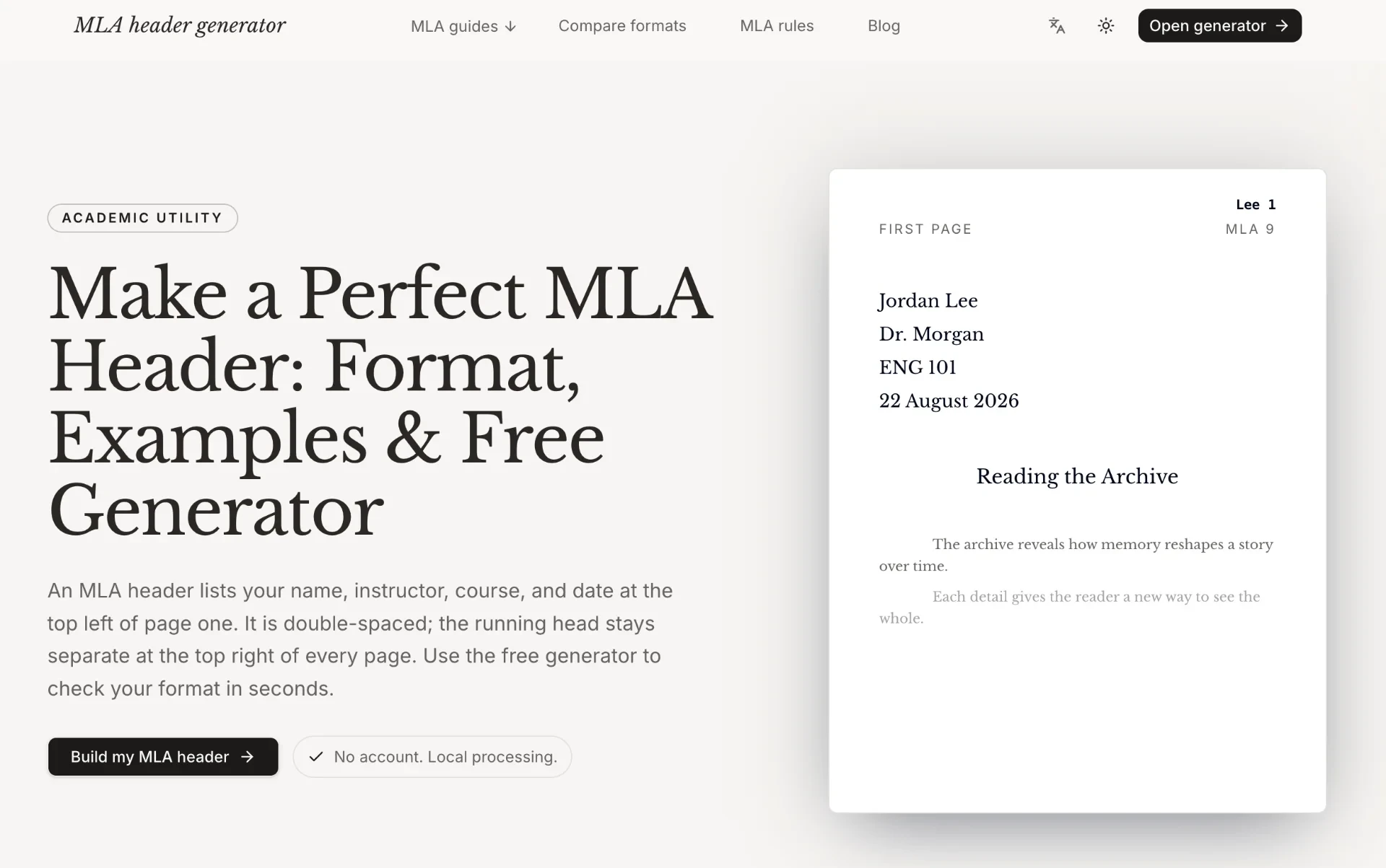
HeaderGenerator.io is a free online tool designed specifically to help students create, understand, and check MLA 9 headers. For many students, the difficult part of MLA formatting is not typing their name, instructor, course, and date. The challenge is knowing exactly where each element belongs, how the first-page heading differs from the running head, how the date should be written, where the page number belongs, and how the entire structure should appear before the paper is submitted. HeaderGenerator.io brings these details into one streamlined workflow where users can enter their information, preview the result, check common formatting requirements, and then continue working in Microsoft Word or Google Docs. An MLA paper normally begins with a four-line heading at the upper left of the first page. This heading contains the student's full name, instructor, course, and date. Below it comes the centered title and then the first paragraph of the paper. The running head is a separate element placed at the upper right of the page and normally contains the student's surname and page number. One of the most common mistakes students make is confusing these two elements. Some repeat the complete four-line heading on every page, while others manually type page numbers or use the wrong style of running head. HeaderGenerator.io is designed to make these distinctions easier to understand and apply. The process starts with a small set of inputs. Users enter their name, instructor, course, date, and title, and the generator organizes the information into an MLA-style first-page structure. Instead of manually adjusting spaces, tabs, margins, and alignment in a word processor, users can start from a clear generated layout. The tool is intentionally focused on the information that belongs in the MLA heading, so users do not need to upload a complete essay just to create the header. A live preview is one of the most useful parts of the experience. As users enter or change their information, they can see how the heading and running head are arranged. The preview makes it easier to spot missing information, incorrect spelling, or an unexpected layout before moving the content into a final document. If the course name changes or the date needs to be corrected, users can make the adjustment immediately and see the updated structure. This provides faster feedback than manually formatting a document and checking the result after every change. Date formatting is another small but important part of MLA style. HeaderGenerator.io explains that MLA uses a day-month-year format with the month written out. For example, the site demonstrates a date such as “4 September 2026” instead of a numeric format such as “09/04/2026.” This distinction can be easy to overlook because numeric dates are common in everyday writing. Including the rule in the generator and checklist gives students a convenient way to catch this formatting issue before submitting their paper. Spacing and page setup are also important. MLA papers use double spacing, and the heading should follow the same general spacing conventions as the rest of the paper. The site's quick reference also points to one-inch margins and an appropriate readable font. HeaderGenerator.io primarily handles the header and heading structure, while Word or Google Docs can be used for the full document settings. This division keeps the online tool focused and lightweight rather than attempting to replace a complete word processor. The distinction between the first-page heading and the running head is especially important for new MLA writers. The four-line heading identifies the paper and appears at the upper left of the first page. It contains the student's name, instructor, course, and date. The running head serves a different purpose: it identifies the author and page number at the upper right throughout the document. The two elements should not be treated as interchangeable. HeaderGenerator.io demonstrates both structures visually so users can understand how they work together on an MLA paper. For example, a properly structured first page might begin with the student's full name, the instructor's name, the course, and the written-out submission date. The paper title would then appear centered below the heading, followed by the first paragraph with the appropriate indentation and spacing. Meanwhile, the upper-right corner would show the student's surname and page number. On page two, the four-line heading would not be repeated. Instead, the running head would continue. This distinction is simple once understood, but easy to miss when formatting a paper manually. HeaderGenerator.io also provides an MLA checklist that helps users review the most important requirements before finishing. The checklist includes items such as having the complete four-line heading, using the correct day-month-year date format, placing the running head in the upper-right corner, maintaining double spacing, and using one-inch margins. This gives students a compact final review instead of forcing them to search through a longer style guide each time they want to verify the basic header setup. For Microsoft Word users, the generator provides an editable DOCX export. After creating the header, users can download the document and continue their paper in Word. This is useful because the generator does not attempt to replace the features of a full word processor. Students can use the online tool for the difficult initial formatting step and then return to the software they already use for writing, editing, citations, and pagination. The downloaded file should still be reviewed on the user's device to make sure the final pagination and assignment-specific requirements are correct. Google Docs users can follow a similar workflow. The generated content can be copied into a Google Docs document, where students can continue adjusting page settings, font, spacing, and automatic page numbers. The website provides separate guidance for Word and Google Docs, making it easier for users to understand how the generated heading fits into their preferred writing environment. This approach keeps HeaderGenerator.io useful regardless of whether the final assignment is written locally or in the browser. This workflow can save students from repeatedly rebuilding the same structure. Without a generator, a student may need to open a blank document, set one-inch margins, choose a font, enable double spacing, type four lines of information, center the title, insert an automatic page number, and then check whether the second page behaves correctly. A small mistake at any point can create additional formatting work. HeaderGenerator.io provides a structured starting point so students can focus on the content of their assignment instead of repeatedly adjusting the basic header. Privacy and simplicity are also part of the product's positioning. The website explicitly highlights “No account” and “Local processing.” Users do not need to create a profile simply to generate an MLA heading, and they do not need to upload their complete paper. They only provide the information required for the formatting task. For students who are uncomfortable sending an unfinished assignment to an online editor, this can be an appealing approach. Not requiring a full document upload also makes the tool more focused. A student's essay may contain personal experiences, original research, course materials, unpublished ideas, or other information that does not need to be processed by a formatting service. Since the HeaderGenerator.io workflow centers on a small group of formatting fields, users can solve the header problem without handing over the entire assignment. The tool can serve both beginners and experienced MLA writers. For beginners, the examples and explanations provide a visual introduction to how MLA headings and running heads work. For experienced users, the generator can act as a quick production and verification tool: enter the information, review the preview, check the checklist, and export the result. The same interface can therefore support learning as well as efficiency. Teachers and educators may also find this type of resource useful when introducing MLA formatting. Students can use the visual examples to understand the structure of a first-page heading and running head before applying it to their own assignments. The site's explanations also highlight common mistakes, such as repeating the heading on every page, using a numeric date, single-spacing the header, adding “Running head:” before the name, or typing page numbers manually. These examples can help students understand not just what to do, but what to avoid. The common mistakes highlighted by the website are especially practical. Repeating the four-line heading on every page creates unnecessary content and does not follow the intended MLA structure. Using a date such as “09/04/2026” can introduce ambiguity and does not follow the preferred MLA written-date format. Single spacing can make the heading inconsistent with the rest of the paper. Adding “Running head:” is another common confusion because that wording is associated with older APA-style instructions rather than the MLA structure. Manually typing a page number can also cause errors when the document changes length. These issues demonstrate why a small formatting tool can still be useful. MLA headers look simple, but they contain several details that must work together. HeaderGenerator.io brings these details into one place, allowing users to generate the basic structure, see it visually, and then review the most important requirements through a checklist. The website also functions as a compact educational reference. It explains what an MLA header is, what information belongs in the four-line heading, how the running head differs from the heading, and how the two elements should appear in a document. Users who are unsure about the terminology can therefore learn the basic concepts before using the generator itself. The overall workflow is intentionally short: add details, review the preview, and use the result. Users provide the necessary information, watch the heading and running head update, and then download or copy the finished content. This simplicity makes the tool particularly suitable for last-minute formatting checks. A student who has already written an essay but notices that the header is wrong can use the generator to reconstruct the correct structure without rebuilding the entire paper from scratch. At the same time, the tool can be used before writing begins. A student can create the correct first-page structure at the beginning of an assignment, download it into Word, and then write directly inside the prepared document. This can reduce the chance of forgetting important formatting details later. HeaderGenerator.io is not intended to replace every part of MLA formatting. It focuses specifically on the header, heading, running head, and related page setup guidance. Students still need to review the complete requirements of their course, including the body of the essay, in-text citations, Works Cited page, paragraph formatting, and any instructor-specific instructions. The generator provides a reliable starting point, but the final assignment should always be checked against the actual requirements of the class. The site's approach can therefore be summarized as a simple combination of generation, explanation, checking, and export. Generation gives users a ready MLA heading. Explanation helps users understand why each part is placed where it is. The checklist helps catch common mistakes. Export makes it possible to continue the work in Word, while copying supports Google Docs workflows. Together, these features turn a small formatting task into a straightforward process that can be completed in a few steps. For students working under a deadline, the biggest advantage may be the reduction of repetitive formatting work. Instead of spending time adjusting tabs, spaces, page numbers, and alignment manually, users can start from a structured result and focus on their actual writing. For beginners, the tool provides a visual example of MLA formatting. For experienced writers, it provides a quick way to confirm that the header structure is correct. Overall, HeaderGenerator.io is a focused MLA 9 formatting assistant that helps users create and verify one of the most common components of an academic paper. It combines a free generator, live preview, MLA checklist, practical formatting explanations, DOCX export, and Google Docs/Word guidance in one lightweight workflow. The service does not require an account or a complete document upload, and its site emphasizes local processing. The core value of HeaderGenerator.io is therefore not complexity but clarity. It takes a task that students often complete manually and turns it into a small sequence of understandable steps: enter the required information, preview the MLA structure, check the formatting rules, and move the result into the writing environment of choice. Whether someone is learning MLA for the first time or simply wants to verify a paper before submission, the tool provides a practical way to reduce formatting mistakes and save time. In the end, HeaderGenerator.io can be viewed as a dedicated bridge between MLA formatting rules and the actual document a student needs to submit. It helps transform names, instructor information, course details, dates, and titles into a properly organized MLA heading, while also making the distinction between the first-page heading and the running head easier to understand. With its emphasis on speed, clarity, privacy, and compatibility with common writing tools, it offers a simple solution for students who want to spend less time fighting document formatting and more time improving the quality of their academic writing.