
Navigation Menu

Upload a reference image and describe what you want to change, then use GPT Image 2.5 to edit the image while keeping important visual details consistent.
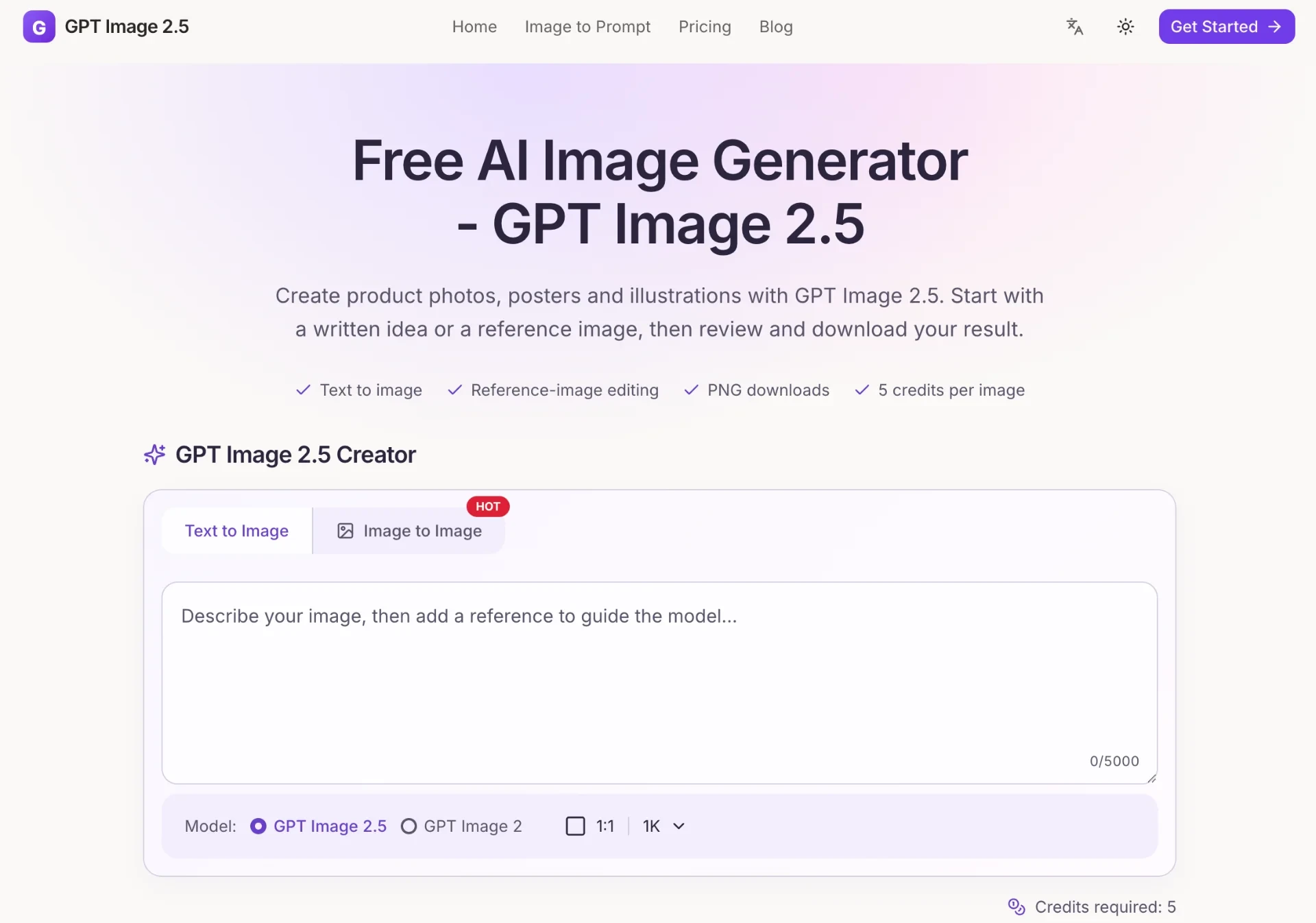
GPT Image 2.5 is an independent AI image generation and editing workspace built for turning ideas into visual content through natural-language prompts and reference images. Instead of requiring users to work through a complicated professional design application, the platform brings the essential steps of AI image creation into a focused browser-based environment. Users can describe an image, optionally provide a reference, choose an output size, generate the result, preview it, and download the finished image. The basic concept behind GPT Image 2.5 is simple: start with an idea and turn that idea into an image. A user might want a polished product scene, an event poster, a story illustration, a portrait, a marketing visual, or an experimental concept. Rather than manually constructing the entire composition, the user can describe the desired subject, environment, composition, lighting, materials, colors, and style in natural language. The platform then uses the selected image-generation workflow to create a visual interpretation of that brief. One of the most important parts of the platform is its text-to-image workflow. Users can write a prompt of up to 5,000 characters, giving them enough space to explain both the main subject and the visual details surrounding it. A useful prompt can describe what should appear in the image, where objects should be positioned, what kind of lighting should be used, what materials or textures should be visible, and what overall mood or aesthetic the final image should communicate. This makes the platform suitable for many different types of visual creation. A product designer might describe a premium product photographed in a controlled studio environment. A marketing professional could request a campaign image with a specific mood and space reserved for a headline. A content creator might generate an illustration for an article or social media post. A small business could explore different product-presentation concepts before commissioning a final design. An artist or visual experimenter could use the platform to test creative directions that would otherwise take much longer to produce manually. GPT Image 2.5 is not limited to generating an image from a blank canvas. The platform also provides reference-image editing, which is useful when a user already has an image but wants to modify it. A single PNG, JPEG, or WebP reference image up to 5 MB can be uploaded, after which the user can describe the desired change in natural language. Instead of rebuilding an entire visual from scratch, the user can begin with an existing image and ask the AI workflow to create a modified version. Reference-based editing can be useful for many practical tasks. For example, a product image may need a different background. A marketing concept might need a different visual atmosphere. A creative image may need a new composition or style. A draft might need a particular element adjusted before it is ready for further design work. By combining a reference image with written instructions, GPT Image 2.5 gives users another way to work: generate from an idea when starting fresh, or edit from an existing visual when a foundation is already available. The platform also encourages users to be specific about what they want. Instead of relying on a loose collection of keywords, a strong prompt can explain the subject, composition, lighting, style, and other constraints. This approach makes it easier to understand why a generated image looks the way it does and what should be changed in the next iteration. For example, a product photography prompt could describe the product's shape, surface, position, lighting direction, background, camera perspective, reflections, and amount of empty space. A poster prompt could explain the central subject, layout, color palette, headline area, visual hierarchy, and overall atmosphere. An illustration prompt could define the characters, environment, artistic style, lighting, and mood. The more clearly the visual objective is communicated, the easier it becomes to evaluate the result and refine the next prompt. GPT Image 2.5 also provides example prompts to help users begin. The current workspace includes examples such as a ceramic coffee cup on a wooden desk with warm morning light, a modern jazz concert poster with a strong color palette and open headline space, and a story illustration featuring a small fox beside a forest stream. These examples demonstrate the kind of information that can be included in an image brief and can be adapted to different projects. Another advantage is the platform's focus on a straightforward workflow. Users do not need to manage multiple applications simply to create and retrieve an AI-generated image. The main process takes place inside one workspace: describe the idea, optionally add a reference, select an output size, generate the image, review the result, and download the final PNG. The output controls are intentionally simple. GPT Image 2.5 currently supports three main output dimensions: 1024 × 1024 for square images, 1536 × 1024 for landscape images, and 1024 × 1536 for portrait images. This gives users a practical choice for common visual formats without requiring them to manually configure complex dimensions. Square images can work well for many social-media posts, product concepts, profile visuals, and general-purpose graphics. Landscape output can be useful for website banners, presentation visuals, campaign concepts, and horizontal compositions. Portrait output can work for mobile-oriented content, posters, character portraits, and vertical social-media formats. Having these three choices makes it easier to start with a format that matches the intended use. Once an image is generated, GPT Image 2.5 provides a preview and download workflow. Users can inspect the result before publishing or using it elsewhere. The platform specifically recommends reviewing text and visual details before publication, which is an important step in any AI image workflow. Even when a generated image looks convincing at first glance, details such as typography, object placement, proportions, or small visual elements may require another iteration. This review-first approach makes GPT Image 2.5 more than a simple one-click image generator. It can function as an iterative creative workspace. A user can start with an initial concept, inspect the result, identify what needs improvement, and then adjust the prompt or reference instructions. Instead of expecting the first generation to be perfect, the workflow supports progressive refinement. The platform is also designed for users who want to keep the image-generation process relatively easy to understand. It does not attempt to bury the core image-generation process behind a large number of technical controls. The essential inputs remain visible: prompt, optional reference image, output size, and generation. This can be particularly helpful for people who are comfortable explaining a visual idea but do not necessarily have extensive experience with professional image-editing software. For creators, this means a project can begin with a simple sentence. For marketers, it means a campaign concept can be visualized before the final production process. For ecommerce teams, it can provide a starting point for product-scene exploration. For writers and publishers, it can help develop illustrations and supporting visuals. For designers, it can serve as a rapid ideation tool for exploring possible directions before moving into a more detailed design workflow. The platform's credit-based pricing system is another notable part of its design. Each successful image generation costs five credits. This provides a relatively direct relationship between usage and credit consumption. If a task fails, the platform states that the credits are returned. Interrupted requests are also reconciled when the user next opens the generator after the stated period. The current plans include Starter, Standard, and Premium options. The Starter plan provides 400 credits per payment, equivalent to up to 80 successful images at five credits each. The Standard plan provides 900 credits, or up to 180 images at the same rate, while the Premium plan provides 2,000 credits, or up to 400 images. The listed monthly prices are $20, $40, and $80 respectively. All plans use the same available model and supported output sizes, while including text generation, single-reference editing, PNG downloads, and recent task history. This structure is useful for users who want to understand their image-generation budget without having to calculate complicated per-feature pricing. If a user has a certain number of credits, the number of possible successful generations can be estimated directly from the five-credit image cost. Another practical feature is recent task history. Image creation is often iterative, and users may need to revisit previous work. Keeping recent tasks accessible within the workspace provides a convenient way to return to earlier generations rather than treating every image as a completely isolated session. The platform also supports PNG downloads, which makes it easier to move generated images into other creative workflows. A user can generate an initial concept in GPT Image 2.5, download the PNG, and then continue working in another design application if additional manual adjustments are needed. GPT Image 2.5 is therefore best understood not as a replacement for every professional design tool, but as a focused AI visual creation environment. Its strength lies in making the first stages of image production fast and accessible: explain the visual idea, generate a version, review it, make adjustments, and download the result. The platform's independence is also important to understand. Despite the name GPT Image 2.5, the website identifies itself as an independent workspace for AI image generation and editing. Users should not interpret the website as an official OpenAI service. The site's positioning is centered on providing access to its own image-generation workflow rather than claiming to be an official OpenAI product. This distinction is useful when evaluating the platform. GPT Image 2.5 is the name used by the website for its image-creation experience, while the site itself is independently operated. Users can therefore approach it as an independent AI image workspace that provides generation and editing capabilities through its web interface. The platform also encourages responsible review before publishing. AI-generated images can contain small inaccuracies or unexpected details, especially when the prompt includes complex compositions, text, or multiple objects. Reviewing the image at full size before using it publicly can help catch issues that are not immediately obvious in a thumbnail or quick preview. For commercial content, this review step can be particularly important. A product image should accurately represent the intended product. A promotional poster should contain correct wording and visual information. A marketing asset should fit the brand's intended appearance. A generated portrait should match the desired creative direction. GPT Image 2.5 can accelerate the creation of these assets, but human review remains an important part of the workflow. The combination of generation, reference editing, output controls, previewing, and downloading gives GPT Image 2.5 a broad range of potential uses. For ecommerce, users can create product-scene concepts, experiment with backgrounds, and explore different visual directions. For marketing, users can turn campaign ideas into initial visuals, explore different moods, and develop image concepts around a specific message. For social media, creators can generate square or portrait visuals suited to common content formats. For publishing, writers can create illustrations and visual concepts to accompany articles, stories, or other written material. For design exploration, users can test different compositions, styles, and environments before committing to a more detailed production process. For personal creative projects, anyone with an idea can experiment with visual concepts without needing advanced design skills. One of the strongest characteristics of the platform is its ability to connect natural-language thinking with visual production. Many people can describe what they want to see more easily than they can build it manually. GPT Image 2.5 allows that description to become the starting point of the creative process. Instead of asking a user to understand layers, brushes, masks, vector paths, or advanced compositing techniques, the platform starts with a simple question: what should the image contain and how should it look? The user provides the answer in natural language, and the AI handles the initial visual construction. This makes the platform particularly interesting for rapid experimentation. A single idea can be turned into an initial image, evaluated, and refined. If the background is wrong, the prompt can be adjusted. If the composition needs more space, the description can be changed. If the mood is too bright or too dark, the lighting and color direction can be revised. If an existing image is already close to the target, a reference-based edit can be used instead of starting over. The result is a workflow that emphasizes iteration rather than perfection on the first attempt. In practical terms, GPT Image 2.5 provides a simple path from idea to image: